Building Jarvis: A Locally-Run AI Command Center for the Home Lab
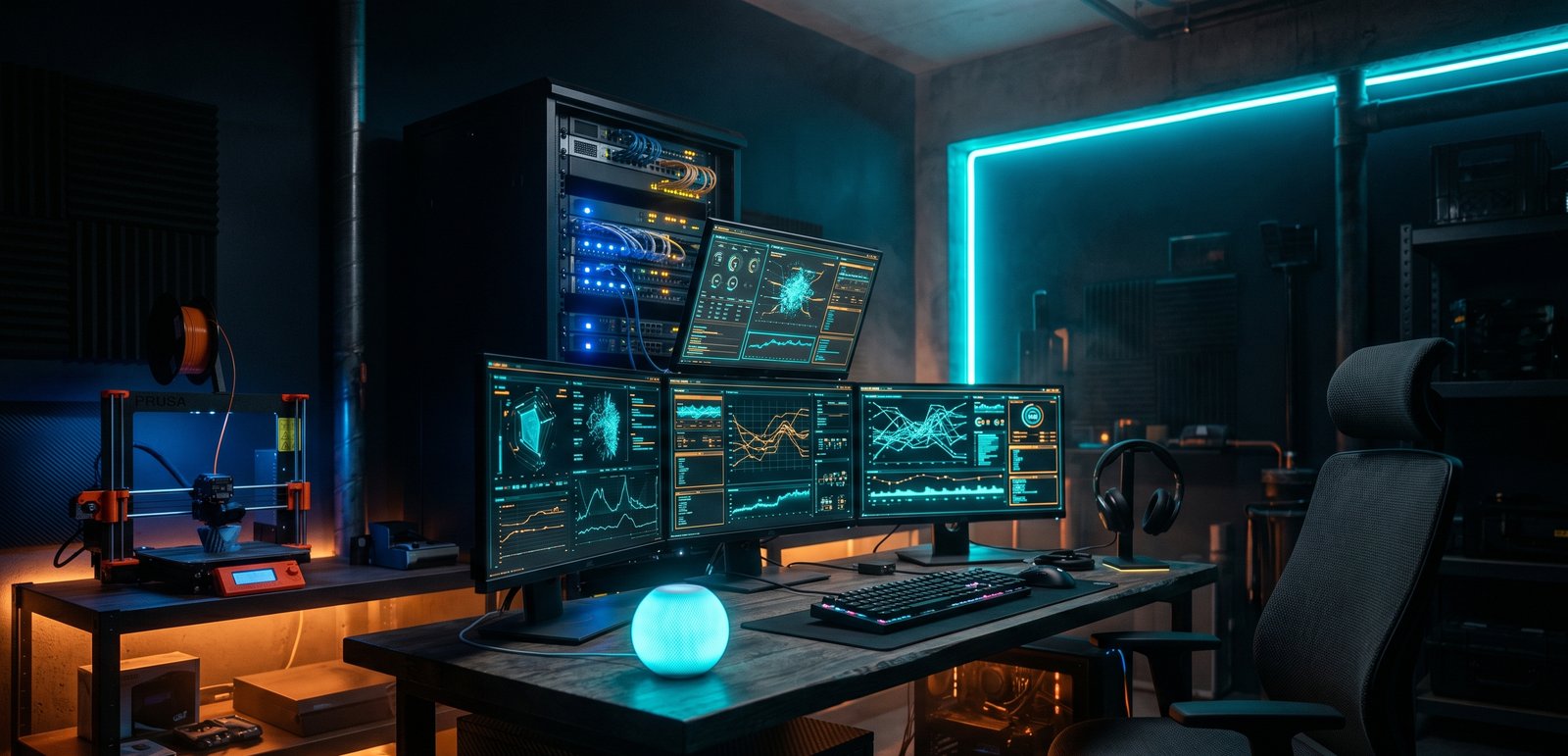
Every maker has that one project that quietly eats every other project. For me it's Jarvis — a locally-run AI assistant that lives in what I call the Batcave: a multi-machine home lab and command center that runs my house, my print farm, my dev work, and a handful of experiments that have no business working as well as they do.
The pitch I gave myself was simple: I want to talk to my house, and I want the brain to live under my own roof — not in someone else's data center. No subscription voice assistant phoning home with every request. No "I'm sorry, I can't help with that." Just a system I own end to end, that gets smarter every time I build onto it.
This is the story of that build. Not the polished marketing version — the real one, with the dead-end weekends, the 3 a.m. "why is it doing that" sessions, and the small handful of moments where the whole thing suddenly felt alive.
The North Star
Before any hardware, there was a principle: everything runs locally, and everything is recoverable.
That second half matters more than it sounds. A home assistant that can turn off your lights is a toy. A home assistant you've wired into your printers, your media, your dev environment, and your daily routine is infrastructure — and infrastructure that only exists as a running process on one machine is a disaster waiting to happen. So from early on, Jarvis had two non-negotiables:
1. Local inference. The language models that power Jarvis run on machines in my house. Voice in, voice out, decisions in between — all on hardware I can touch. 2. Disaster recovery as a first-class feature. If any machine dies, I should be able to rebuild it from version control and a runbook, not from memory and a prayer.
Those two ideas shaped everything that followed.
The Shape of the System
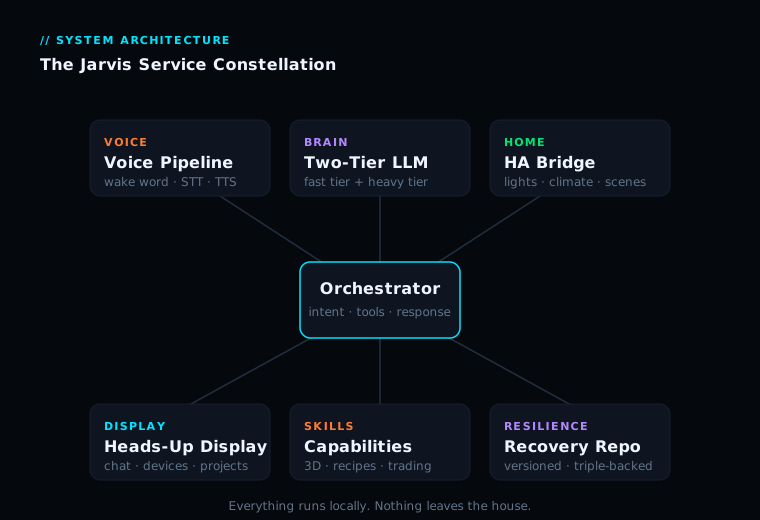
Jarvis isn't one program. It's a small constellation of services, each doing one job well, talking to each other over the home network. At the center sits an orchestrator — the part that takes "what did the human say," figures out intent, calls the right tools, and decides what to say back.
Around it: a voice pipeline (wake-word detection, speech-to-text, text-to-speech), a language-model layer split into a fast tier and a heavy tier, a home-automation bridge into Home Assistant, a heads-up display dashboard, and a growing set of capabilities — 3D model generation, recipe management, a paper-trading bot, multi-room audio, and more.
The beauty and the curse of a system like this is that every capability is its own little build. Which is why I'm breaking this into this overview plus a series of deep-dives on the individual pieces.
Milestone 1: Getting It to Listen and Talk
The first real milestone wasn't intelligence — it was presence. Getting a wake word to trigger reliably, capturing clean audio, transcribing it accurately, and speaking back in a voice that didn't sound like a 2005 GPS unit.
The breakthrough was treating the voice node as its own dedicated device — a small single-board computer with a proper far-field microphone array — rather than bolting a mic onto a busy server. Text-to-speech landed on streaming the speech sentence-by-sentence instead of waiting for the whole response to synthesize, so Jarvis starts talking while it's still "thinking" about the end of its sentence.
The struggle: audio routing in a multi-room house is its own rabbit hole. Getting the right words out of the right speakers — and only the right speakers — at the right volume, with quiet hours respected at night, took more engineering than the voice recognition itself.
Milestone 2: A Brain That Runs at Home
The headline feature: the language models run locally. I settled on a two-tier model architecture — a smaller, faster model for the bulk of conversational turns, and a larger model for the heavy lifting. This split is the single most important design decision in the whole project.
The struggle — and a lesson I keep relearning: at one point Jarvis felt sluggish, and I was sure the speculative decoding had gone wonky. Then I actually measured it on the live machines — and the models were running exactly as designed. The real lesson was verify before you diagnose. Measure the actual machine. Don't let a plausible story substitute for a number.
> Deep-dive: The Brain in the Basement — how the two-tier local LLM setup works, and the day I almost "fixed" a system that was working perfectly.
Milestone 3: Wiring Into the House
The leap to usefulness came from wiring Jarvis into Home Assistant. Now Jarvis can check whether the garage is open, report room temperatures, run scenes, control lights, and report on the printers — through a tool-calling loop that chains several actions to answer a complex request.
The struggle: networking. Getting reliable, stable network paths between a virtualized Home Assistant, the host, and the rest of the LAN turned into a multi-week saga of stale routing tables and connections that silently decayed. The fix: pinned routes, locked-down address resolution, and a watchdog that bounces the connection the instant it detects trouble.
Milestone 4: The Capabilities Start Stacking
Once the foundation was solid, capabilities landed fast:
- 3D model generation by voice — "generate a 3D printable model of a small robot bust at ultra quality" kicks off a pipeline that announces when it's ready and casts the rotating result to the right screen.
- Recipe management — import from a URL, structure the ingredients, cast a TV-optimized view to the kitchen display.
- A paper-trading bot — scans prediction markets hourly, reasons with the local model, logs simulated trades. No real money, ever.
- Email rundowns — summarize the inbox and draft replies, but never hit send. Drafts only.
- Speaker recognition — gate sensitive actions to my voice specifically.
> Deep-dives: From Spoken Word to 3D Print and The Bot That Traded Nothing for Six Days.
Milestone 5: Making It Bulletproof
The milestone nobody puts on a highlight reel: what happens when a machine dies? I took a full inventory of every service across every machine and built a proper disaster-recovery system — a single source-controlled repository, organized by machine, with secrets deliberately kept out and replaced with documented placeholders. The repo lives in three places, and a pre-commit guard blocks anything that looks like a credential.
The validation: the inventory turned up way more running services than my notes had captured, and the secret-guard caught a live credential on day one before it could reach the repo.
> Deep-dive: If a Drive Dies Tonight — building disaster recovery for a sprawling home lab.
The Equipment
The hardware that makes the Batcave run: a gaming/workstation PC (current-gen high-core CPU, 64GB RAM, top-tier GPU), a Linux server hosting the always-on services, two compact AI edge devices for the language-model tiers, a single-board computer as the dedicated voice node, a high-refresh OLED 4K primary display plus an ultrawide touchscreen bar display, living-room and bedroom kiosks, a studio audio chain with multi-zone output, multiple 3D printers with multi-material units, and a networking/storage backbone of managed switches, a private mesh-VPN, and network-attached storage doubling as the local backup target.
The philosophy throughout: mostly off-the-shelf, integrated obsessively. The magic isn't any single exotic component — it's that all of it talks to all of it, with Jarvis on top as the unifying interface.
What I've Actually Learned
- Verify before you diagnose. Numbers from the real machine beat a plausible story every time.
- Code belongs in version control, not in prose. Notes are not a backup.
- Defense in depth on anything sensitive. One safety check will eventually fail.
- Build the boring plumbing well. Audio routing and network stability determine whether the system is pleasant to live with.
- Each capability compounds. The first feature is the hardest; by the tenth you're standing on a foundation that makes new ideas cheap to try.
Where It's Going
Jarvis is never "done" — that's the point. On the horizon: tighter room-awareness, expanded camera and security integration, more of the fabrication pipeline wired in, and a visual "face" so the command center has a presence to look at. But the version running today already does something I didn't think a home build could pull off: a real, useful, private AI assistant that runs entirely under my own roof and gets better every weekend.
— Colby, NerdlyBuilds